← Alipta BallavUX Case Study

Microsoft · Dynamics 365 Contact Center

Conversation
Orchestration

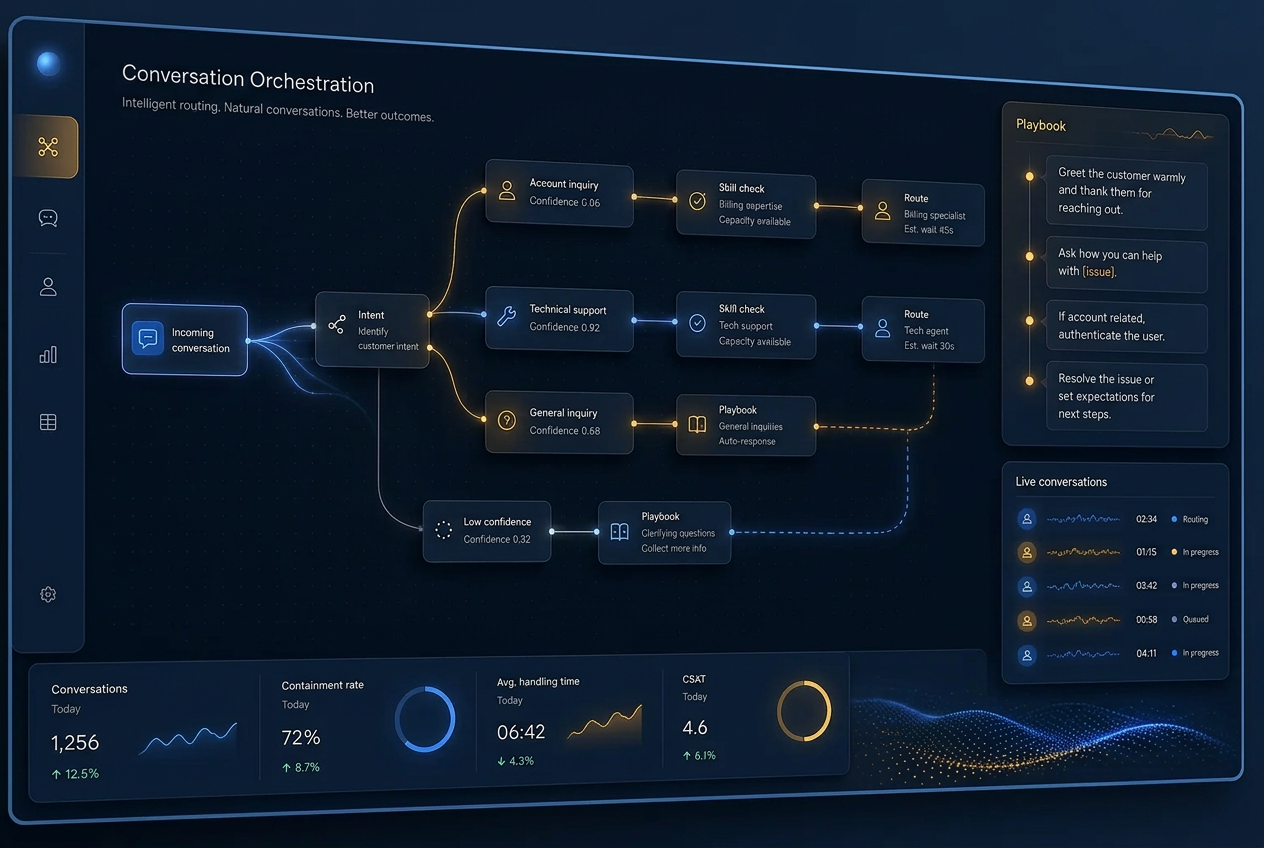
An AI-powered orchestration layer that watches the entire conversation lifecycle and acts on it — replacing static, hand-maintained routing rules with playbooks written in plain language.

Role

Individual Contributor — Product Design (Squad)

Surface

Copilot Service admin center

Status

Public Preview · 700+ customers

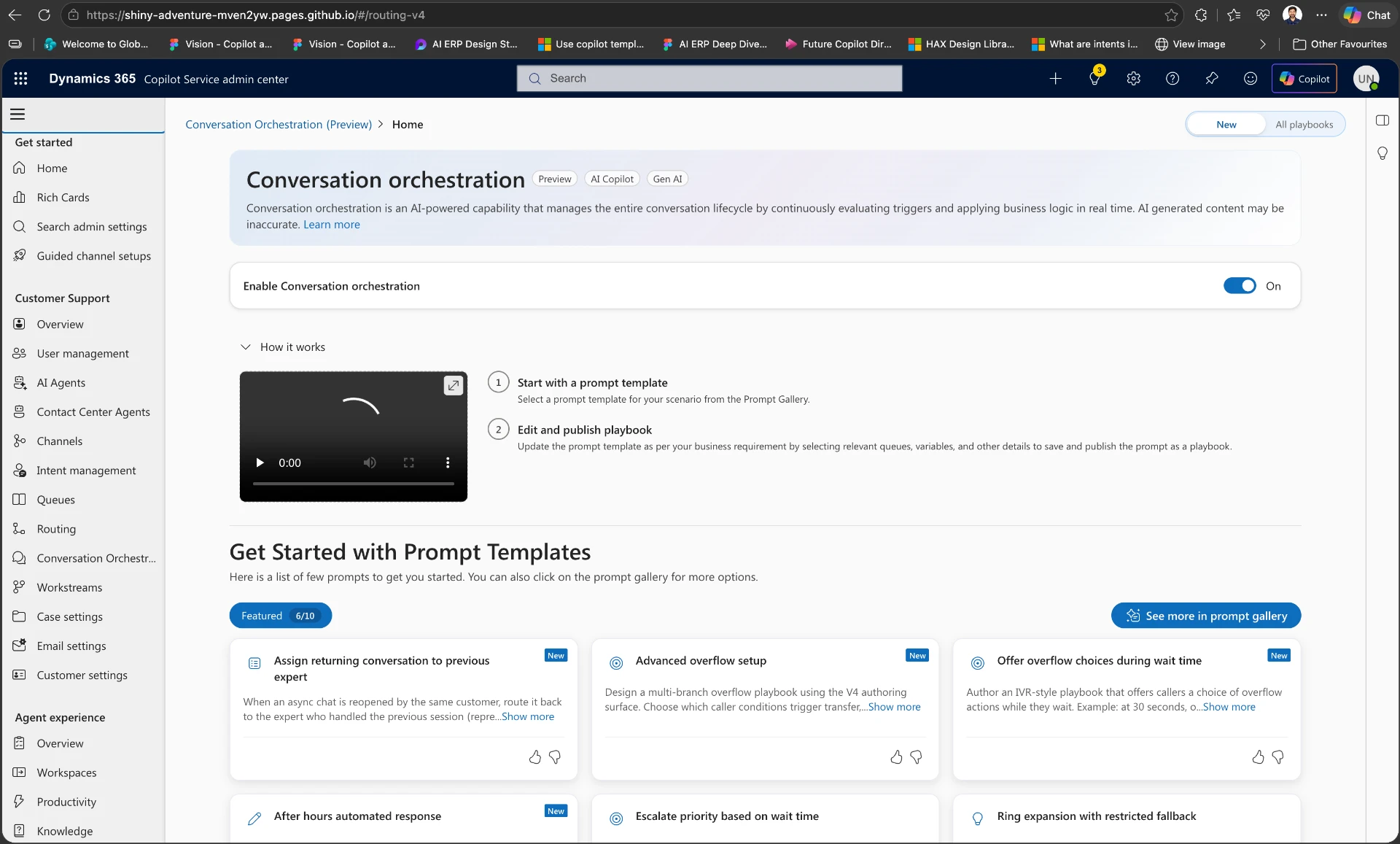
Conversation Orchestration home in the Dynamics 365 Copilot Service admin center, showing the enablement toggle, how-it-works steps and featured prompt templates.

The Conversation Orchestration home in Copilot Service admin center — enablement, guided setup and the prompt gallery.

The Problem

Routing rules don't survive contact with reality.

Traditional contact center routing is rule-heavy: configuration duplicated across queues, decisions made once at arrival, and no ability to react when operational conditions shift mid-conversation. At enterprise scale it becomes brittle and expensive to maintain.

  • Static, one-time routing decisions
  • Duplicate setup across every queue
  • No response to live queue health
  • Painful maintenance at scale

My Role

Three design moves I helped land.

Move 01

Made AI logic inspectable

Admins won't hand control to a black box. I pushed for a live policy preview, grounded variables and clear fallback actions so every decision feels visible and overrideable.

Move 02

Shifted the mental model from arrival to lifecycle

Routing was understood as a one-time queue assignment. I reframed the experience around Observe → Evaluate → Act so teams could see orchestration as continuous, not a single handoff.

Move 03

Scaled authorship through templates

Enterprise admins don't want a blank prompt. I advocated for starter templates and a prompt gallery so teams could adopt playbook-style authoring without starting from zero.

How We Designed It

Swapping the design handoff for a working prototype.

The team was used to a familiar rhythm: designers in Figma, engineers in code, a handoff in the middle. But the pace of AI work made that boundary expensive. Static mock-ups couldn't capture how a playbook would behave across live conversation states, so I proposed a different starting point — VS Code and GitHub Copilot as the first design tool.

The pushback was immediate: “We need Figma. We can't use the code designers produce.” Fair concern — generated code from experiments isn't production-grade. But the point wasn't to replace engineering; it was to collapse the distance between intent and execution. I paired with engineers, turned Copilot drafts into scaffolded flows, and used working code as the artifact we reviewed together.

That changed the game. Conversations shifted from “Does the mock-up feel right?” to “Does the behavior actually work?” The team started iterating in the medium it would eventually ship in — and the boundary between design and engineering got a lot thinner.

Before

Figma → spec → handoff → engineering build

Static screens, heavy documentation, and a gap between what was designed and what the system could actually do.

After

Copilot-assisted prototype → co-review with engineering → ship

Designers explore in code alongside engineers, iterating in the real medium and tightening the feedback loop.

The outcome: we moved faster on uncertain terrain, caught feasibility issues earlier, and created a shared language between design and engineering around what the AI was actually supposed to do.

The Shift

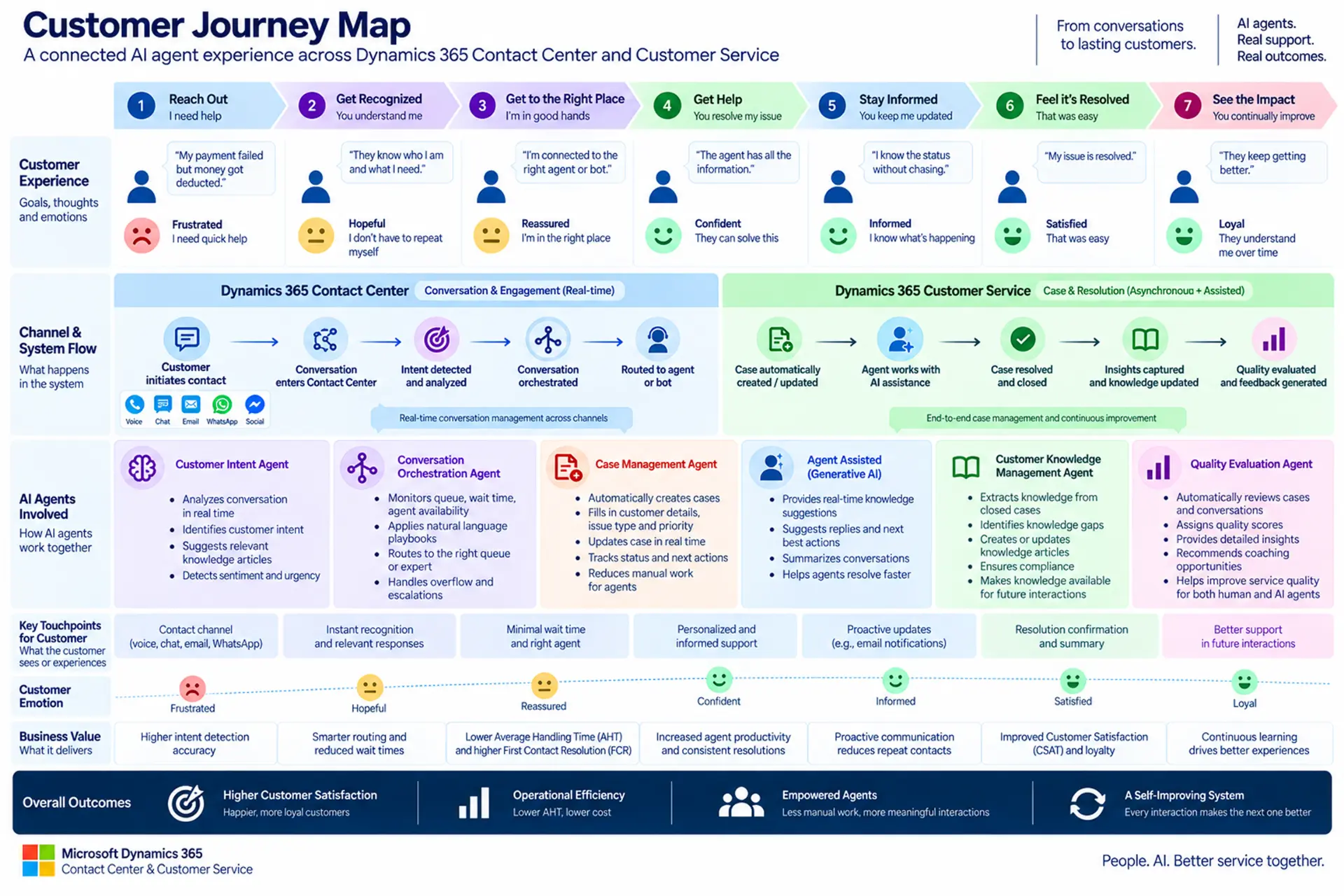
From fixed workflows to an adaptive control plane for every conversation.

The core innovation: administrators author business outcomes as natural-language playbooks instead of configuring routing and overflow logic by hand. AI translates intent into deterministic, executable logic — so decisions move from arrival-time to the whole lifecycle, continuously optimizing toward a self-adjusting contact center.

01

Observe

The platform listens to lifecycle events across every live conversation — arrival, wait, transfer, abandonment risk.

02

Evaluate

AI translates the admin's natural-language playbook into deterministic logic and evaluates it against deep CRM and operational context.

03

Act

Prioritize, route, overflow, reconnect — actions execute automatically, with traceability and validation built in.

What It Does

Four capabilities, one lifecycle.

Capability 01

Dynamic Prioritization

Priority adjusts itself in real time — wait time, transfers, customer tier, business value and queue health continuously re-order the queue. FIFO becomes a fallback, not the default.

Capability 02

Intelligent Overflow

When queues saturate, go out of hours, or a direct-dial fails, the playbook responds: transfer, offer callback, schedule callback, voicemail — or present the customer with live choices.

Capability 03

Preferred Expert & Reconnection

Relationship history becomes a routing signal. Customers reconnect to the representative they already know, preserving context and continuity of care.

Capability 04

Bullseye Routing

When the ideal expert isn't available, eligibility expands in concentric rings — team, then region, then country — relaxing constraints over time without sacrificing experience.

Designing for Admins

Power without the config sprawl.

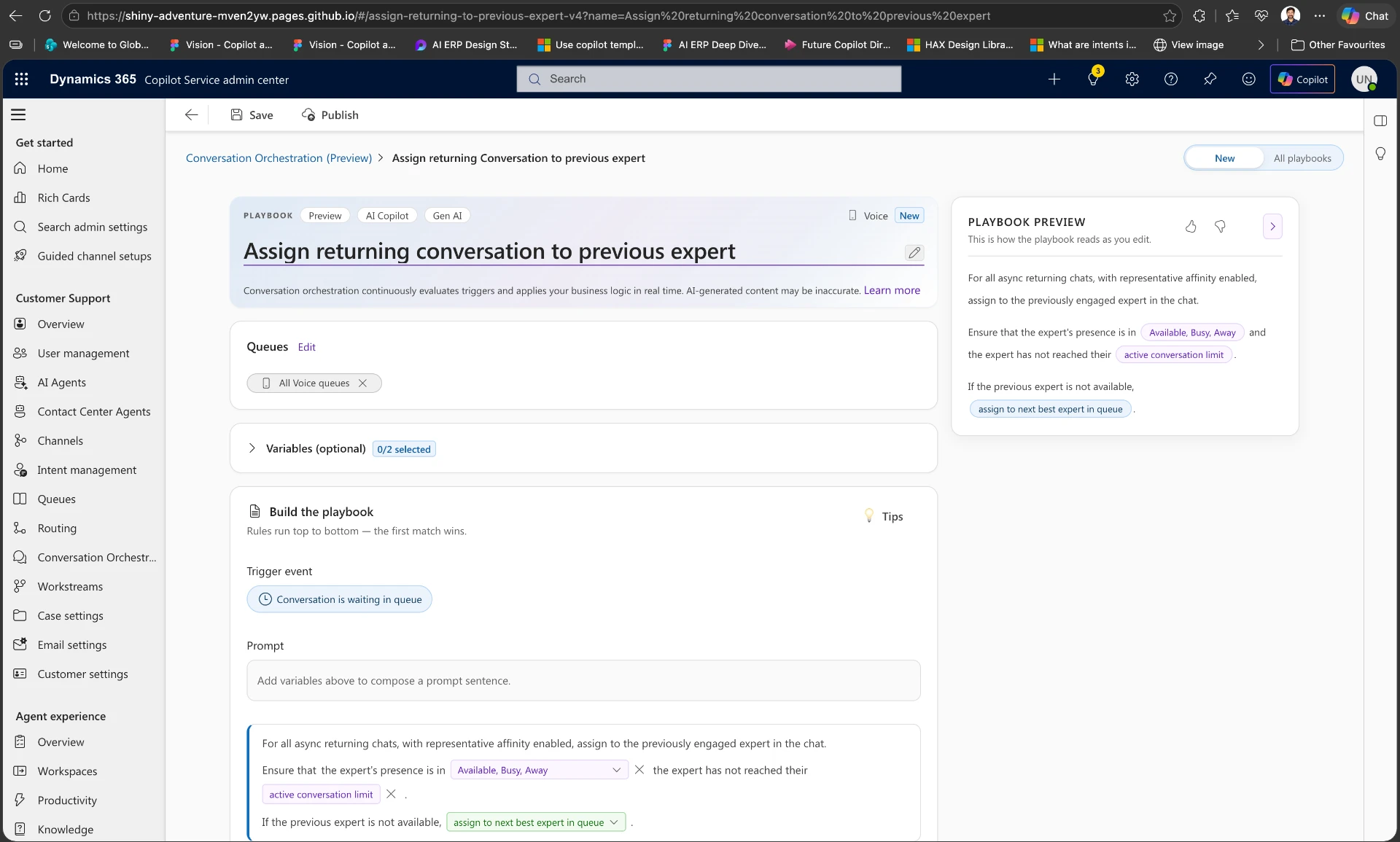
The design strategy centred on making an AI-authored system trustworthy: admins start from a prompt gallery and starter templates, reference live context — conversation attributes, customer profiles, queues, user groups, operational signals — and stay in control with validation, guardrails and explainability.

  • Prompt gallery & starter templates
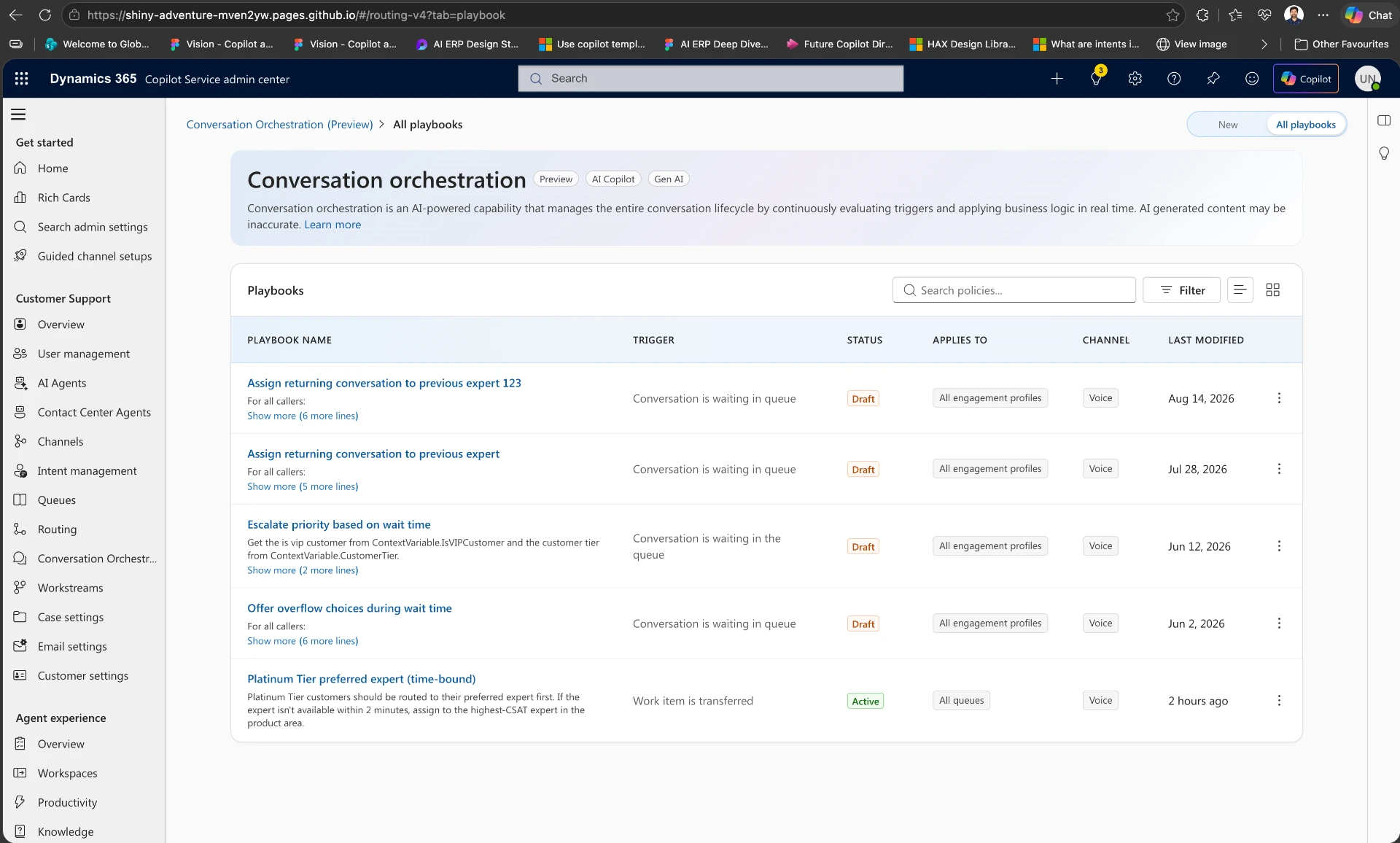
  • Playbook management
  • Validation & guardrails
  • Policy explainability
  • Grounded contextual variables
  • Traceability & diagnostics
Conversation Orchestration home in Copilot Service admin center showing the enablement toggle, how-it-works steps and featured prompt templates.
Playbooks list in Copilot Service admin center showing multiple active orchestration policies.
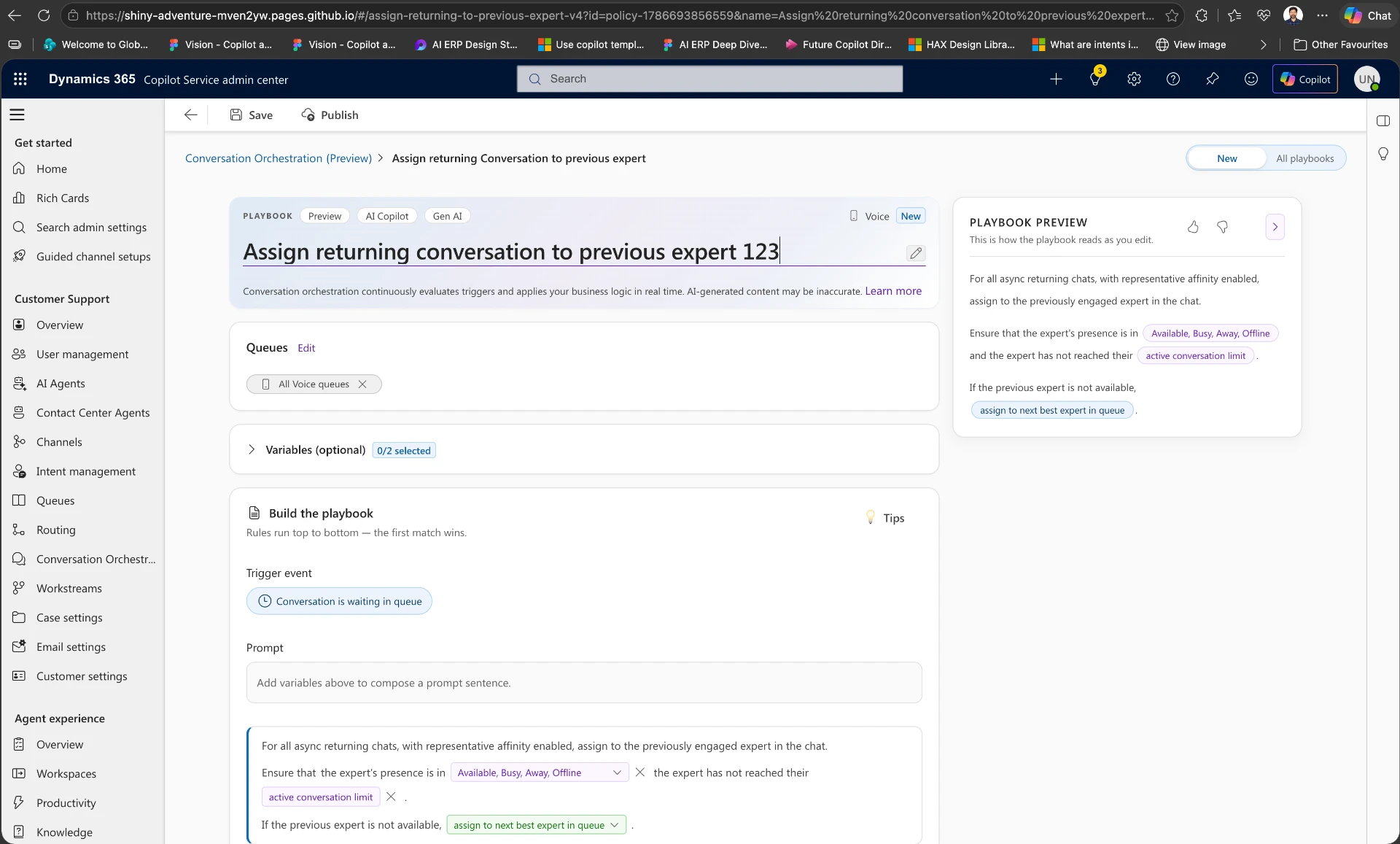
Playbook editor for 'Assign returning conversation to previous expert' with trigger event, grounded variables and live preview.
Live playbook preview panel reading the policy back as it will execute for a returning conversation.
Product home: enablement, guided setup and a prompt gallery that lowers the barrier to authoring orchestration policies.01 / 04

Designed to Move

Success metrics

Routing accuracyFirst contact resolutionCSATService levelsAgent utilizationReduced abandonmentLower operational cost

700+

Customers in public preview

01

Natural-language playbooks replace rule-heavy config

100%

Of the conversation lifecycle under continuous orchestration

5

Overflow actions authored in plain language

L0→L1

From one-time routing decisions to continuous adaptation

"The north star: a self-optimizing contact center that anticipates load, expands expert pools on its own, and continuously improves the customer experience."